Plan Smarter. Grow Stronger. Don’t miss our latest financial strategies.


July 23, 2026
When You Get an IRS Notice CP2000, How Do You Handle the Audit?
✅ Information Verified By a CPA





Pulling a letter from your mailbox with the IRS logo and "Proposed Amount Due" in bold is enough to make any taxpayer's heart drop. But receiving this envelope doesn't mean an IRS agent is preparing to dig through your desk drawers.
This document, IRS Notice CP2000, is an Under reporter Inquiry generated by the IRS's Automated Under reporter (AUR)system. It's technically a form of audit, but one that's entirely computer driven. Understanding how the IRS structures this inquiry, and executing a precise response, is what resolves it without paying more than you actually owe.
The Meaning Behind the CP2000
The IRS uses automated matching programs to cross-reference the numbers on your Form 1040 against the tax documents third parties submit on your behalf.
Every time an employer issues a W-2, a bank reports interest on a 1099-INT, or a brokerage reports stock sales on a1099-B, a copy goes to the IRS. If the agency's computers detect that an income source reported under your Social Security number was left off your return, the system flags the account.
The computer then automatically calculates the taxes, interest, and potential penalties you'd owe if that missing income were added to your return, packages the numbers into a letter, and mails it to your address on file. At this stage, no human IRS agent has reviewed your actual tax return. The letter is a computer-generated proposal of what the system thinks you owe, not a final bill.
Why the IRS Sent the Letter
To understand what you are dealing with, it helps to review a real-world example of how a CP2000 notice displays proposed changes.
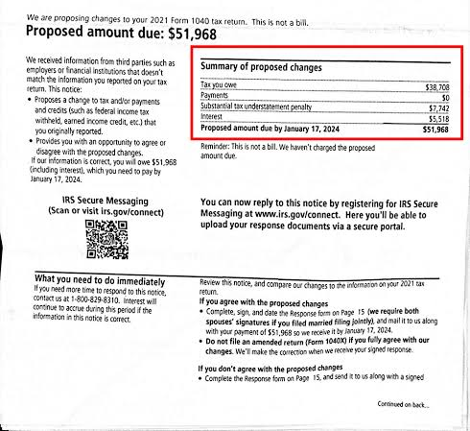
As shown in the example, the notice displays a "Proposed amount due." It looks like a bill, but the notice will explicitly state: "This is not a bill." It is a proposed assessment.
The mismatch can come from a range of sources, but a few show up repeatedly. Stock or cryptocurrency sales are a frequent culprit: brokerages report gross proceeds to the IRS, and if you don't report the sale yourself, the system assumes your cost basis was $0 and taxes the entire amount as profit. Side income is another common trigger, a single forgotten 1099-NEC or 1099-MISC from a freelance gig or consulting project gets flagged instantly. Retirement account activity, like an unreported rollover or early withdrawal on Form1099-R, shows up often too. Beyond those, smaller sources like unreported interest or dividends, unemployment compensation, gambling winnings, or a joint account where income landed under the wrong Social Security number can all generate the same kind of automated mismatch.
How to Respond to a CP2000 Notice
Since this is an automated process, your response needs to be organized and on time. Missing the strict 30-day deadline the IRS sets can cause the agency to default the case and issue a formal Notice of Deficiency.
First 48 Hours: Do not pay the proposed amount immediately
Take a breath before writing a check. The IRS's initial calculation is frequently incorrect, since the automated system doesn't factor in business deductions, tax credits, or actual cost basis.
Week 1: Compare the notice with your tax documents
Pull your copy of the return for the year in question. Match the "Information Reported to IRS" section on the CP2000 against your actual W-2s, 1099s, orK-1s to pinpoint exactly which document caused the mismatch.
Week 2: Determine your response position
You have three options on the CP2000 response form:
- Agree: If the IRS is 100% correct, sign the agreement form and pay the balance (or set up a payment plan).
- Partially Disagree: If some of the income is yours but the IRS's calculation is wrong(e.g., they omitted your stock cost basis).
- Disagree: If the income belongs to someone else (identity theft/mismatched SSN) or was already reported elsewhere on your return.
Week 3: Assemble your supporting documentation
If you disagree or partially disagree, write a clear, concise explanation letter and back it up with proof: corrected 1099s, broker statements showing cost basis, or receipts for deductible expenses.
Before the 30-Day Deadline: Submit the response package
Send your signed response form and supporting documents by fax or certified mail with return receipt requested, and keep a complete copy of everything, including the mailing receipt, for your records.
The "Don’t File an Amended Return” Rule
A common mistake, even among less experienced preparers, is immediately filing an amended return (Form 1040-X) after receiving a CP2000.
While that seems logical, the CP2000 instructions specifically state not to file an amended return for the issues listed on the notice. Doing so routes the amendment to a different IRS processing unit, which can result in the tax being assessed twice or significantly delay resolution of the inquiry. The only time to file an amended return alongside a CP2000 is to correct additional, unrelated errors on that same tax return.
Penalties, Interest, and How to Request Abatement
The IRS frequently adds a substantial accuracy-related penalty, typically 20% of the unpaid tax, plus accumulated interest.
Interest is mandated by law and can't be waived, but penalties can be fought, and there are two main paths to do it. If you've filed and paid on time for the past three years with no prior penalties, First-Time Abate (FTA) is usually the faster route: it doesn't require proving hardship, just a clean compliance history, and the IRS can grant it over the phone in many cases. If you don't qualify for FTA, or the penalty is for a different reason, Reasonable Cause is the fallback. If the mismatch happened because of a medical emergency, records lost to a natural disaster, or reliance on incorrect advice from a tax professional, you can request abatement under the IRS's Reasonable Cause guidelines. That request needs to be submitted inwriting, backed by supporting documentation, alongside your CP2000 response package.
How Sproutax Defends Your Return
Navigating an automated audit alone is stressful, especially when the other side of the conversation is an automated IRS unit. Sproutax steps in to handle the entire dispute process.
The team pulls official IRS master transcripts to verify exactly what the agency has on file, recalculates the actual tax liability, including missing cost basis and deductions, and drafts a response package built to hold up. Sproutax coordinates directly with the IRS's AUR unit to secure a "No Change" letter or minimize the proposed assessment, so you only pay what you legally owe.
Conclusion
An IRS Notice CP2000 is stressful, but it's ultimately a matching error that gets resolved with systematic documentation. Understanding the mismatch, resisting the urge to file a rushed amended return, and submitting a clear response package before the 30-day deadline is what protects your finances.

About The Author
Alan Nathan, is a CPA and has spent more than 36 years helping individuals and trustees navigate taxation with confidence. He enjoys sharing his insights and experience to make taxes easier to understand. Throughout his career he has guided clients toward smart strategies and real savings. He believes in giving individual taxation the attention to detail it deserves and is passionate about using taxation to create opportunities for long–term financial success.
FAQs
How long does the IRS have to send a CP2000 notice?

What happens if I completely ignore a CP2000 notice?
Can I request more time to respond to a CP2000 letter?
What if the CP2000 income belongs to someone else?


Get A Call From Our Team Of Expert CPAs

Get Insights
We analyze your previous year return to tell you strategies that can help you plan better.

Seamless Experience
Submit & get a call from our client relations team to connect you with our CPAs.

Pricing That Makes Sense
We tailor pricing based on the complexity of your return so that you pay the right price.

Office Address:
720 Hopmeadow Street2nd Floor
Simsbury, CT 06070
Mail: info@sproutax.com
Phone: (860) 251-9449
Phone: (860) 251-9449
© 2026 Sproutax. All rights reserved.
.svg)
.svg)
